OOP in Flutter: Where Concepts Come Alive
Every Flutter widget you write uses OOP. This page shows exactly how encapsulation, inheritance, abstraction, and mixins power the framework — using StatefulWidget as the primary example.
Why OOP Matters in Flutter
Flutter is built entirely on object-oriented principles. When you write StatefulWidget, you're using inheritance. When you call setState(), you're using encapsulation. When you override build(), you're using abstraction. When you mix in TickerProviderStateMixin, you're using mixins.
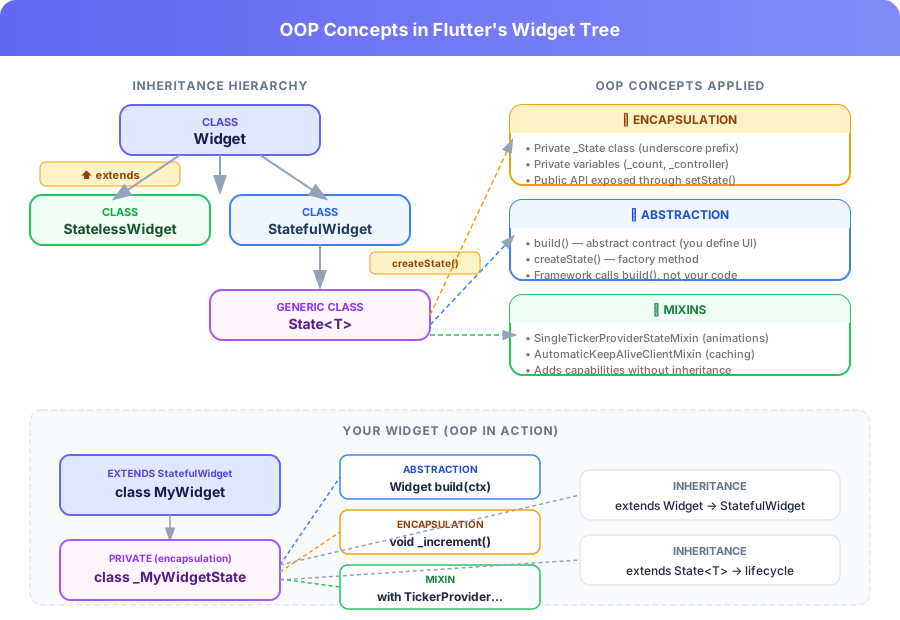
Visual: How encapsulation, inheritance, abstraction, and mixins map to Flutter's widget hierarchy
| OOP Concept | Flutter Example | Where You See It |
|---|---|---|
| Encapsulation | Private _State class, private variables | Every StatefulWidget |
| Inheritance | extends StatefulWidget, extends State | Every widget definition |
| Abstraction | Abstract build() method | Every widget's build method |
| Mixins | TickerProviderStateMixin | Animations, scrolling |
Encapsulation in Widgets
In Flutter, encapsulation is everywhere. The underscore prefix (_) makes variables and classes private to their file. This is Dart's version of access control — and it's critical for keeping widget state safe.
class CounterWidget extends StatefulWidget {
  // Public: anyone can read this
  final int initialValue;

  const CounterWidget({super.key, this.initialValue = 0});

  @override
  State<CounterWidget> createState() => _CounterWidgetState();
}

// PRIVATE: only this file can access _CounterWidgetState
class _CounterWidgetState extends State<CounterWidget> {
  // Private state — external code CANNOT modify this directly
  late int _count;

  @override
  void initState() {
    super.initState();
    _count = widget.initialValue; // Read public property from widget
  }

  // Private method — internal logic hidden from outside
  void _increment() {
    setState(() => _count++);
  }

  void _decrement() {
    setState(() => _count--);
  }

  @override
  Widget build(BuildContext context) {
    // Only expose what's necessary through the UI
    return Row(children: [
      IconButton(onPressed: _decrement, icon: const Icon(Icons.remove)),
      Text('$_count'),
      IconButton(onPressed: _increment, icon: const Icon(Icons.add)),
    ]);
  }
}_count were public, any parent widget could accidentally set it to an invalid value. By keeping it private and only exposing changes through setState(), you guarantee the widget always goes through a controlled state update path. This is encapsulation protecting your app from bugs.
Inheritance: StatelessWidget & StatefulWidget
Every Flutter widget inherits from a base class. This is inheritance in action — child classes get all the behavior of their parent and can override or extend it.
// Flutter's class hierarchy (simplified)
class Widget                    // Root of all widgets
  └─ class StatelessWidget       // Immutable widgets
       └─ class StatefulWidget    // Mutable widgets with state

// YOUR widget inherits from StatefulWidget
class MyToggleSwitch extends StatefulWidget {
  const MyToggleSwitch({super.key});

  @override
  State<MyToggleSwitch> createState() => _MyToggleSwitchState();
}

// Your State class inherits from State<T>
class _MyToggleSwitchState extends State<MyToggleSwitch> {
  bool _isOn = false;

  @override
  Widget build(BuildContext context) {
    return Switch(
      value: _isOn,
      onChanged: (val) => setState(() => _isOn = val),
    );
  }
}
Notice how _MyToggleSwitchState inherits:
- From
State<MyToggleSwitch>: access towidget,context,setState(), lifecycle methods - From
StatefulWidget: the ability to create mutable state viacreateState() - From
Widget: thekeyparameter and widget tree integration
class FancyButton extends PrimaryButton extends Button, use composition: wrap a Button inside a FancyButton. Flutter's own framework follows this pattern — widgets compose other widgets rather than extending them deeply.
Abstraction: The Widget Build Method
The build() method is Flutter's abstraction contract. Every widget must implement it. The framework doesn't care how you build your UI — it only cares that you return a Widget. This is the essence of abstraction: defining what must be done without specifying how.
// Abstract: defines the contract, no implementation
abstract class BaseCard extends StatelessWidget {
  final String title;

  const BaseCard({super.key, required this.title});

  // Abstract: subclasses MUST implement this
  Widget buildContent(BuildContext context);

  // Concrete: shared layout that calls the abstract method
  @override
  Widget build(BuildContext context) {
    return Card(
      child: Column(children: [
        Text(title, style: const TextStyle(fontSize: 18, fontWeight: FontWeight.bold)),
        buildContent(context), // Calls the abstract method
      ]),
    );
  }
}

// Concrete: implements the abstract method
class UserCard extends BaseCard {
  final String email;

  const UserCard({super.key, required super.title, required this.email});

  @override
  Widget buildContent(BuildContext context) {
    return Text('Email: $email');
  }
}

class ProductCard extends BaseCard {
  final double price;

  const ProductCard({super.key, required super.title, required this.price});

  @override
  Widget buildContent(BuildContext context) {
    return Text('Price: \$${price.toStringAsFixed(2)}');
  }
}BaseCard defines the algorithm (layout structure), and subclasses provide the specific content. You get consistent UI with flexible content — all through abstraction.
Mixins: Lifecycle & TickerProvider
Flutter uses mixins extensively to add capabilities to State classes without deep inheritance. The most common example is TickerProviderStateMixin, which gives your State the ability to create animation controllers.
// Without mixin: you'd need to extend a custom class
// With mixin: just add the capability directly
class AnimatedHeart extends StatefulWidget {
  const AnimatedHeart({super.key});

  @override
  State<AnimatedHeart> createState() => _AnimatedHeartState();
}

// Mixin adds Ticker capability without inheritance
class _AnimatedHeartState extends State<AnimatedHeart>
    with SingleTickerProviderStateMixin {

  late AnimationController _controller;
  late Animation<double> _scaleAnimation;

  @override
  void initState() {
    super.initState();
    // vsync: this — the mixin makes "this" a TickerProvider
    _controller = AnimationController(
      vsync: this,
      duration: const Duration(milliseconds: 300),
    );
    _scaleAnimation = Tween<double>(begin: 1.0, end: 1.3)
        .animate(CurvedAnimation(parent: _controller, curve: Curves.easeOut));
  }

  @override
  void dispose() {
    _controller.dispose(); // Clean up — encapsulated resource management
    super.dispose();
  }

  void _toggle() {
    _controller.isCompleted ? _controller.reverse() : _controller.forward();
  }

  @override
  Widget build(BuildContext context) {
    return GestureDetector(
      onTap: _toggle,
      child: ScaleTransition(
        scale: _scaleAnimation,
        child: const Icon(Icons.favorite, size: 48, color: Colors.red),
      ),
    );
  }
}TickerProvider were a base class, you'd have to choose between extending TickerProviderState OR State<MyWidget>. Since Dart only allows single inheritance, you'd be stuck. Mixins solve this — you can use with TickerProviderStateMixin while still extending State. This is the power of composition over inheritance.
StatefulWidget Deep Dive: OOP in Every Line
Let's dissect a complete StatefulWidget and identify every OOP concept at work:
// 1. INHERITANCE: extends StatefulWidget
// 2. ENCAPSULATION: constructor parameters are public, state is private
class TaskInput extends StatefulWidget {
  final void Function(String) onTaskAdded;

  const TaskInput({super.key, required this.onTaskAdded});

  // 3. ABSTRACTION: createState() is the abstract factory method
  @override
  State<TaskInput> createState() => _TaskInputState();
}

// 4. ENCAPSULATION: underscore makes this class private
class _TaskInputState extends State<TaskInput> {
  // 5. ENCAPSULATION: private state variable
  final TextEditingController _controller = TextEditingController();

  // 6. INHERITANCE: overriding initState from State
  @override
  void initState() {
    super.initState(); // Always call super first
  }

  // 7. ENCAPSULATION: private method — internal logic
  void _submitTask() {
    final text = _controller.text.trim();
    if (text.isNotEmpty) {
      widget.onTaskAdded(text); // Call the public callback
      _controller.clear();
    }
  }

  // 8. INHERITANCE: overriding dispose from State
  @override
  void dispose() {
    _controller.dispose(); // Clean up resources
    super.dispose();
  }

  // 9. ABSTRACTION: build() — the framework calls this, you define what
  @override
  Widget build(BuildContext context) {
    return Row(children: [
      Expanded(
        child: TextField(
          controller: _controller,
          decoration: const InputDecoration(hintText: 'Add a task...'),
          onSubmitted: (_) => _submitTask(),
        ),
      ),
      IconButton(
        icon: const Icon(Icons.add_task),
        onPressed: _submitTask,
      ),
    ]);
  }
}- Inheritance —
extends StatefulWidget,extends State - Encapsulation — Private
_TaskInputState, private_controller, private_submitTask() - Abstraction —
build()andcreateState()are abstract contracts the framework calls - Polymorphism —
widget.onTaskAddedis a callback that could be any function signature
Full Example: Task Manager with OOP
Here's a complete Task Manager app that demonstrates all four OOP concepts working together in a single Flutter screen:
import 'package:flutter/material.dart';

// ===== DATA MODEL (Encapsulation + Inheritance) =====
class Task {
  final String id;
  final String title;
  final DateTime createdAt;

  Task({required this.title})
      : id = DateTime.now().millisecondsSinceEpoch.toString(),
        createdAt = DateTime.now();

  // Encapsulated: immutable data, only factory creates new instances
  factory Task.create(String title) => Task(title: title);
}

// ===== MAIN WIDGET (Inheritance + Abstraction) =====
class TaskManagerScreen extends StatefulWidget {
  const TaskManagerScreen({super.key});

  @override
  State<TaskManagerScreen> createState() => _TaskManagerScreenState();
}

// ===== PRIVATE STATE (Encapsulation) =====
class _TaskManagerScreenState extends State<TaskManagerScreen> {
  final List<Task> _tasks = [];
  final TextEditingController _inputController = TextEditingController();

  // Private: only this state manages task operations
  void _addTask() {
    final title = _inputController.text.trim();
    if (title.isNotEmpty) {
      setState(() {
        _tasks.add(Task.create(title));
      });
      _inputController.clear();
    }
  }

  void _removeTask(String id) {
    setState(() {
      _tasks.removeWhere((t) => t.id == id);
    });
  }

  @override
  void dispose() {
    _inputController.dispose();
    super.dispose();
  }

  // Abstraction: build() returns the widget tree
  @override
  Widget build(BuildContext context) {
    return Scaffold(
      appBar: AppBar(title: const Text('Task Manager')),
      body: Column(children: [
        // Input area
        Padding(
          padding: const EdgeInsets.all(16),
          child: Row(children: [
            Expanded(
              child: TextField(
                controller: _inputController,
                decoration: const InputDecoration(
                  hintText: 'What needs to be done?',
                  border: OutlineInputBorder(),
                ),
                onSubmitted: (_) => _addTask(),
              ),
            ),
            const SizedBox(width: 8),
            ElevatedButton(onPressed: _addTask, child: const Text('Add')),
          ]),
        ),
        // Task list
        Expanded(
          child: _tasks.isEmpty
              ? const Center(child: Text('No tasks yet. Add one above!'))
              : ListView.builder(
                  itemCount: _tasks.length,
                  itemBuilder: (context, index) {
                    final task = _tasks[index];
                    return ListTile(
                      title: Text(task.title),
                      subtitle: Text('Created: ${task.createdAt}'),
                      trailing: IconButton(
                        icon: const Icon(Icons.delete),
                        onPressed: () => _removeTask(task.id),
                      ),
                    );
                  },
                ),
        ),
      ]),
    );
  }
}mixin CompletedTaskTracker that counts completed tasks, and an abstract BaseTaskList widget with a template method pattern. This will solidify all four OOP concepts in a real Flutter context.
Summary
- Encapsulation — Private
_Stateclasses and variables protect widget state from external mutation - Inheritance — Every widget extends
StatefulWidgetorStatelessWidget, inheriting lifecycle methods and framework integration - Abstraction — The
build()method is an abstract contract: the framework calls it, you define the UI - Mixins —
TickerProviderStateMixinand others add capabilities without deep inheritance chains - Polymorphism — Callbacks, event handlers, and widget composition rely on flexible type contracts